> For the complete documentation index, see [llms.txt](https://help.blings.io/llms.txt). Markdown versions of documentation pages are available by appending `.md` to page URLs; this page is available as [Markdown](https://help.blings.io/readme.md).

# Blings Help Center

<h2 align="center">Blings Help Center</h2>

<p align="center">Guides for building, delivering, validating, monitoring, and improving enterprise MP5 projects with Blings Platform and Blings Studio.<br></p>

{% hint style="info" %}
Looking for the self-serve Blings app at [app.blings.io](https://app.blings.io)? It has separate documentation. Go to the [Blings app Help Center](https://help.blings.io/docs).
{% endhint %}

## Start Here

Choose the path that matches what you need. This Help Center is designed for both first-time Blings users and teams that need exact technical answers, product how-tos, and implementation reference.

<table data-view="cards"><thead><tr><th></th><th></th><th data-hidden data-card-target data-type="content-ref"></th></tr></thead><tbody><tr><td><strong>Learn the Basics</strong></td><td>Start here for Blings value, use cases, the app ecosystem, MP5 concepts, project lifecycle, and the terms used across Platform and Studio.</td><td><a href="/pages/eOKWAsvqqEyevHSsB6ec">/pages/eOKWAsvqqEyevHSsB6ec</a></td></tr><tr><td><strong>Build or Change an MP5</strong></td><td>Use Studio guides when you need to understand scenes, layers, timing, connectors, data bindings, flow maps, previews, and creative publishing.</td><td><a href="/pages/HJLmxqx5Lda9OQtaCUVd">/pages/HJLmxqx5Lda9OQtaCUVd</a></td></tr><tr><td><strong>Operate or Launch a Project</strong></td><td>Use Platform guides for analytics, content updates, flow management, data setup, simulation, integration, player settings, forms, and optimization.</td><td><a href="/pages/vcNIkVG2DBfI7SBBBS8G">/pages/vcNIkVG2DBfI7SBBBS8G</a></td></tr><tr><td><strong>Integrate and Implement</strong></td><td>Use developer guides for SDK setup, CRM data, API-oriented workflows, player settings, custom analytics, and technical implementation details.</td><td><a href="/pages/ArPyOLjJg7hv38kMKwKO">/pages/ArPyOLjJg7hv38kMKwKO</a></td></tr></tbody></table>

## Common Tasks

| If you need to...                         | Start with                                                          | Then go deeper                                                                                                                |
| ----------------------------------------- | ------------------------------------------------------------------- | ----------------------------------------------------------------------------------------------------------------------------- |
| Understand what Blings does               | [Blings Value and Use Cases](/guides/blings-value-and-use-cases.md) | [MP5 Basics](/guides/mp5-basics.md)                                                                                           |
| Know which app to open                    | [Ecosystem and Apps](/guides/ecosystem-and-apps.md)                 | [Platform and Studio Workflow](/apps/apps-workflow.md)                                                                        |
| Build or edit the video experience        | [Studio Basics](/guides/studio-basics.md)                           | [Studio Guide](/apps/blings-studio/studio.md)                                                                                 |
| Configure fields and personalization data | [Data Fundamentals](/guides/data-fundamentals.md)                   | [Data, Catalog, and Forms](/apps/blings-platform/data-catalog-and-forms.md)                                                   |
| Add buttons, branches, or viewer actions  | [Interactivity Basics](/guides/interactivity-basics.md)             | [Connectors](/apps/blings-studio/connectors.md)                                                                               |
| Collect submitted viewer data             | [Collect Viewer Data](/guides/collect-viewer-data.md)               | [Input Field](/apps/blings-studio/connectors/input-field.md) and [Submit Form](/apps/blings-studio/connectors/submit-form.md) |
| Prepare a campaign for launch             | [Launch, Measure, and Optimize](/guides/launch-measure-optimize.md) | [Integration](/apps/blings-platform/integration.md)                                                                           |
| Implement with SDK or CRM data            | [Developer and Integration](/role-guides/developer.md)              | [Getting Started with the SDK](/role-guides/developer/getting-started/getting-started-with-blings.io-dynamic-video-sdk.md)    |
| Review security and privacy               | [Security and Data Privacy](/role-guides/info-sec.md)               | [MP5 Integration and Security Guide](/role-guides/info-sec/mp5-integration-and-security-guide.md)                             |

<h2 align="center">Blings Apps</h2>

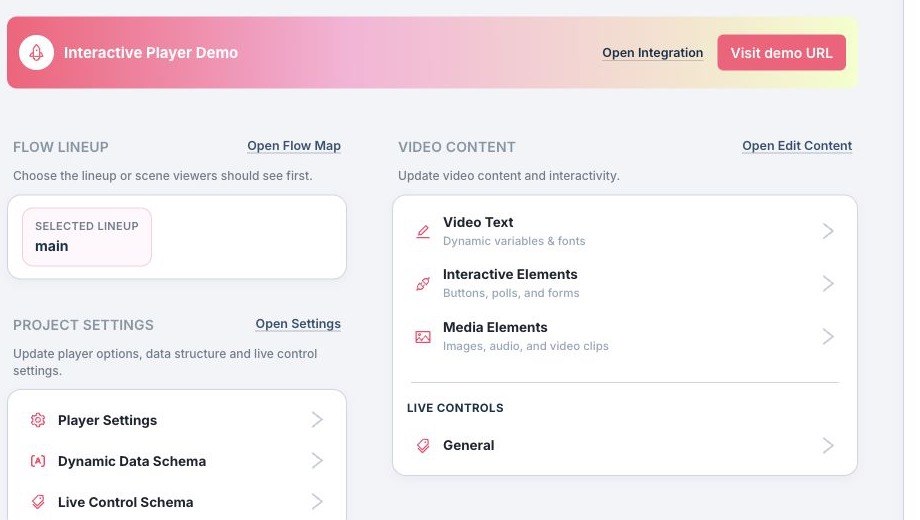
<table data-view="cards"><thead><tr><th></th><th></th><th data-hidden data-card-target data-type="content-ref"></th><th data-hidden data-card-cover data-type="files"></th></tr></thead><tbody><tr><td><strong>Blings Platform</strong></td><td>Operate MP5 projects: review analytics, update approved content, configure data and live controls, simulate personas, prepare integrations, tune player settings, and manage optimization.</td><td><a href="/pages/vcNIkVG2DBfI7SBBBS8G">/pages/vcNIkVG2DBfI7SBBBS8G</a></td><td><a href="/files/j1sRvHLaNNmll6YlqiRj">/files/j1sRvHLaNNmll6YlqiRj</a></td></tr><tr><td><strong>Blings Studio</strong></td><td>Build the MP5 experience: edit scenes, review the canvas, manage assets and timing, connect dynamic data, inspect flow maps, preview drafts, and publish creative changes.</td><td><a href="/pages/HJLmxqx5Lda9OQtaCUVd">/pages/HJLmxqx5Lda9OQtaCUVd</a></td><td><a href="/files/lY3kEjdsCFkE5JNel0Oa">/files/lY3kEjdsCFkE5JNel0Oa</a></td></tr></tbody></table>

<h2 align="center">Role Guides</h2>

<table data-view="cards"><thead><tr><th></th><th></th><th data-hidden data-card-target data-type="content-ref"></th><th data-hidden data-card-cover data-type="files"></th></tr></thead><tbody><tr><td><strong>Creator and Designer</strong></td><td>Create MP5 templates, manage dynamic creative behavior, and work with After Effects or Blings Studio.</td><td><a href="/pages/RWQkdgcDudvVYKA6zoFY">/pages/RWQkdgcDudvVYKA6zoFY</a></td><td><a href="/files/7gahJYqMUrEYedqWamPS">/files/7gahJYqMUrEYedqWamPS</a></td></tr><tr><td><strong>Developer and Integration</strong></td><td>Connect MP5 projects to CRM, websites, APIs, SDK flows, spreadsheet delivery, and runtime data.</td><td><a href="/pages/ArPyOLjJg7hv38kMKwKO">/pages/ArPyOLjJg7hv38kMKwKO</a></td><td><a href="/files/imfLNjFoAWiOHOSWeOEq">/files/imfLNjFoAWiOHOSWeOEq</a></td></tr><tr><td><strong>Security and Data Privacy</strong></td><td>Review architecture, data handling, privacy controls, compliance posture, and enterprise security material.</td><td><a href="/pages/6uy0D5tyYHSUuawddQZJ">/pages/6uy0D5tyYHSUuawddQZJ</a></td><td><a href="/files/4pWOkhNu3XoVLjG4R9Dl">/files/4pWOkhNu3XoVLjG4R9Dl</a></td></tr></tbody></table>

<h2 align="center">Popular Videos</h2>

<table data-view="cards"><thead><tr><th></th><th></th><th data-hidden data-card-cover data-type="image">Cover image</th><th data-hidden data-card-target data-type="content-ref"></th></tr></thead><tbody><tr><td><strong>Blings Overview</strong></td><td>Blings high-level overview and use cases.</td><td><a href="/files/BnmuvOUf0CqL935PNMI9">/files/BnmuvOUf0CqL935PNMI9</a></td><td><a href="/pages/OACUB8y8JdxRS4q6arag">/pages/OACUB8y8JdxRS4q6arag</a></td></tr><tr><td><strong>Blings Product Walkthrough</strong></td><td>From video creation to AI optimization</td><td><a href="/files/BjvYpboTYf3HZEwr9EFR">/files/BjvYpboTYf3HZEwr9EFR</a></td><td><a href="/pages/GmlS4SXn8pTtHWhVyKHa">/pages/GmlS4SXn8pTtHWhVyKHa</a></td></tr></tbody></table>

<a href="/pages/8JQu72YtJPLonsNbj6YE" class="button secondary" data-icon="video">See More Videos</a>